What Does Wearable Data Accessibility Actually Mean?
A wearable can display years of charts and still give its owner very little control over the underlying records. For lifelogging, accessibility starts when measurements leave the proprietary interface in a form that another tool can read.
I use an extraction test: a device family qualifies when its documented workflow produces a portable account archive, an individual activity file, or an authenticated API response. Screenshots, emailed summaries, and app-only graphs fail that test. They preserve an interpretation of the data rather than the records themselves.
Files That Survive the App
Here, “raw” means timestamped, machine-readable records that remain available after the original app session ends. Useful outputs include CSV, JSON, XML, FIT, TCX, and GPX. Some contain direct sensor samples; others contain calculated sleep stages, readiness scores, or workout summaries. The important point is that the user can retain and process them independently.
There are three practical levels of retrieval:
- Complete account history for backups and long-term analysis.
- One-session downloads for inspecting a run, ride, sleep period, or measurement.
- Automated API queries for requesting records between defined start and end dates.
The Ownership Test
If closing an app also removes your ability to inspect its records, you have dashboard access rather than durable data access.
The seven device families below meet at least one of these retrieval levels. Their exports differ sharply in usability, however. A clean FIT activity and a huge XML archive may both be portable, yet they demand very different amounts of work.
Garmin and Apple Watch: The Mainstream Export Giants
Garmin and Apple sit near the top of the portability ladder for opposite reasons. Garmin produces established workout files that move easily between tools. Apple gathers a broader mixture of health information, then places it inside a technically complete but awkward archive.
Garmin’s Training Files
Garmin Connect allows an individual recorded activity to be retained as a FIT file. When the relevant sensors supplied the information, that file can contain timestamped laps, heart rate, cadence, power, altitude, and GPS fields. TCX and GPX versions are also available for software that does not accept FIT.
This matters in ordinary use. A runner can record a workout, download it, and import it into desktop or self-hosted analysis software without building a conversion pipeline. Garmin also provides an asynchronous full-account archive for users assembling a longer historical record.
Apple’s Broad XML Export
Apple Health consolidates samples from the watch, phone, and compatible applications. Its ZIP export contains an export.xml file whose records can include the sample type, source, unit, value, start date, and end date. The breadth is valuable for reconstructing a personal health timeline.
The practical catch appears after download. Several months or years of records produce a large XML document rather than spreadsheet-ready rows. Everyday analysis generally requires an XML parser, a conversion utility, or scripting knowledge. Developers can explore the official Apple HealthKit developer documentation, but the canonical user export remains less approachable than Garmin’s activity files.
Oura Ring and Whoop: API Access for Recovery Tracking
Recovery platforms become more interesting once the goal shifts from occasional export to a dashboard that refreshes itself. Oura offers the cleaner route for personal automation. Whoop exposes useful physiological resources as well, though its structure requires more joining and normalization.
Oura’s Date-Bounded JSON
A personal bearer token can retrieve Oura records through its REST API. Daily activity, readiness, and sleep appear as one-calendar-day summary objects. Timestamped endpoints cover workouts, sessions, tags, heart rate, and rest periods. Requests can use ISO-formatted start and end dates, which makes backfilling a personal database manageable.
That design suits quantified-self projects built around repeatable retrieval. A script can request yesterday’s objects, store the JSON, and refresh the collection after cloud processing finishes.
Whoop’s Linked Resources
Whoop supports user data downloads and an OAuth-based developer interface. Its API separates history into cycle, recovery, sleep, workout, and body-measurement resources. This preserves useful relationships, but it also means an automated system must join records by identifiers and timestamps rather than expect one flattened CSV.
Cloud Comes First
Both Oura and Whoop must sync before an API response or account archive can expose processed records. Neither provides direct extraction from offline device memory.
This boundary deserves attention. An app-visible recovery score may feel immediate, while the retrievable personal record still depends on synchronization and remote processing.
Polar and Suunto: Open Ecosystems for Endurance Athletes
Polar and Suunto are strongest when the unit of analysis is a workout. Their exports preserve the shape of a run, ride, or structured training session with more clarity than they preserve the ambient hours around it.
Polar’s Per-Session Controls
Polar Flow provides explicit download tools in its web-based training log. CSV works well for sample-by-sample inspection, TCX carries training metrics and route information between compatible services, and GPX handles cases where the geographic track is the main concern.
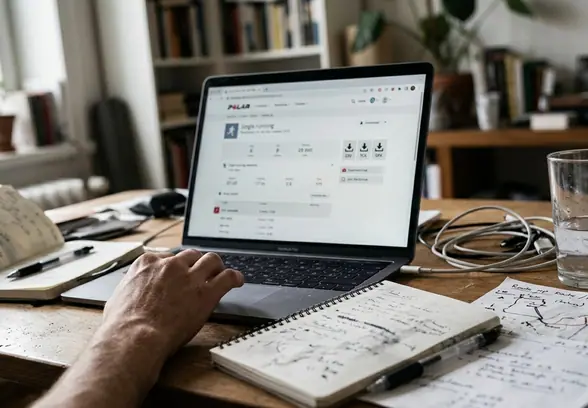
The format choice can follow the question. Use CSV to examine heart-rate changes, TCX to move a complete training session, and GPX to review or remap the route.
Suunto’s Activity Routing
Suunto routes recorded sessions through FIT exports and connected analysis tools. An exported activity can retain timestamps, GPS points, heart rate, cadence, altitude, laps, and power when those channels were recorded. The resulting file remains a bounded session: a 45-minute run stays distinct from the passive measurements before and after it.
That session boundary is useful for endurance analysis and less helpful for continuous lifelogging. Anyone building a round-the-clock model of sleep, movement, and environmental context will find more gaps than someone comparing intervals or routes.
Withings: Clinical-Grade Metrics With Developer Tools
Withings makes more sense as a longitudinal measurement hub than as a single-wearable proposition. Smart scales, blood-pressure monitors, hybrid watches, activity records, sleep data, and cardiac measurements can sit under one account.
Archives Organized by Measurement
The Health Mate web dashboard can generate a historical download containing CSV files organized by data category. Dated rows may include weight, body composition, blood pressure, heart rate, activity, and sleep when compatible devices supplied those values. ECG records or reports can accompany the tabular archive.
This category-based structure fits questions that unfold over weeks or months: how weight readings align with activity, whether home blood-pressure measurements cluster at certain times, or when a particular cardiac record was captured. Interpretation still depends on device context and measurement conditions.
Automating the Measurement Log
The Withings API uses OAuth authorization and supports dated measurement queries. A personal database can ingest new readings on a daily or weekly schedule instead of repeatedly downloading the entire account history.
- Authorize access to the relevant measurement categories.
- Query a defined date range.
- Store values with their timestamps, units, and source categories intact.
- Request only newer records during the next scheduled update.
For a household already using several Withings devices, this creates a coherent archive with relatively little manual file handling.
Which Open-Data Wearable Should You Choose Right Now?
The useful comparison is the FIT-to-XML-to-OAuth portability ladder. Each step adds potential breadth or automation, while also increasing the transformation work required after retrieval.
Choose Garmin for Local Files
Garmin is the strongest fit for someone who wants reliable, offline-friendly workout files without maintaining code. The routine stays simple: record an activity, download FIT or TCX, and open or import it locally. Request the account-wide archive separately when it is time to build a durable historical backup.
Choose Oura for an Automated Dashboard
Oura is the better foundation for developers and committed quantified-self users who are comfortable storing tokens, issuing HTTPS requests, and normalizing JSON. Its date-bounded daily sleep, readiness, and activity objects support a predictable pipeline: request records, store them, and refresh once cloud processing has completed.
Apple suits people who value a broad health repository and can tolerate XML conversion. Polar and Suunto remain compelling for workout-centered analysis, while Withings stands out when scales, blood pressure, and cardiac records matter more than a conventional sports watch.
For most people who care about owning usable wearable records, choose Garmin: FIT and TCX provide the shortest path from a device on your wrist to data you can keep, inspect, and move without code.